

Join nodes
Join nodes combine tables where a column from one equals a column from the other. They take two input nodes. Create a join node by selecting an existing node and clicking New join node on the new node toolbar floating to the right. The first input port will be connected to the previously selected node; connect the second input port to a second node by drawing a connector.
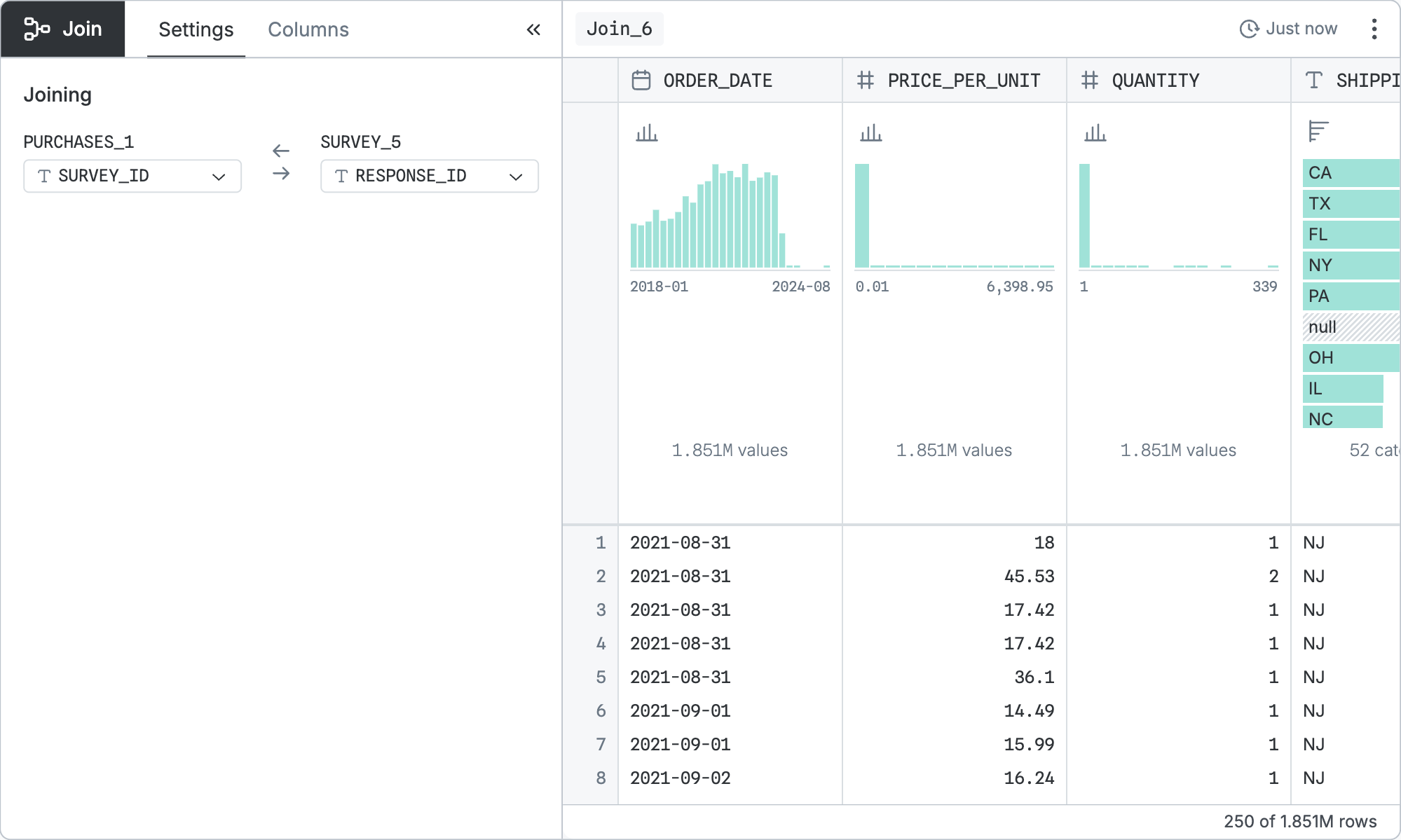
Configuration
The base query is configured by:
- Left column - The column from the first table to join on.
- Right column - The column from the second table to join on.
That base query can be refined by the standard controls shared by all table nodes.
INFO
When a column in the left table has the same name as a column in the right column, the first is renamed with the suffix _LEFT and the second is renamed with the suffix _RIGHT.
SQL equivalent
If you clicked “Copy SQL” in the node menu of the node pictured above, you’d get:
WITH
  "p" AS (…),
  "s5" AS (…)
SELECT
  "p"."ORDER_DATE",
  "p"."PRICE_PER_UNIT",
  "p"."QUANTITY",
  "s5"."AGE",
  "s5"."HISPANIC",
  "s5"."RACE"
FROM "p"
JOIN "s5" ON "p"."SURVEY_ID" = "s5"."RESPONSE_ID"
In the real version, the first … would show the SQL code for the left input node.
The second … would show the SQL code for the right input node.
The third and fourth … would complete the materialization of the columns from the left and right tables.